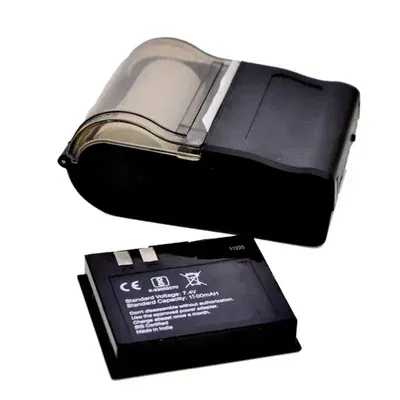
BluPrints Economy 1500, 2 Inch Wireless Thermal Printer with Free Accessories and 1 Year Warranty
| Brand | ":"BluPrints"," |
| Model No | ":"Sampann Economy 1500","Printing Fonts":"Normal, Tahoma and Multilingual Text","Character |
| Size | ":"Tahoma: 2X2.5mm, ANK: 12X26, Double Width, Double Height","Characters per Line":"32 and 48 CPL","Interface":"Bluetooth / USB","Programming & Data Buffer":"Over-the-Air Programmable via Bluetooth, 4,000 bytes of Data Buffer, 16MB","Printing Speed (max.)":"Up to 80 mm/sec","Resolution Width":"8 Dots/mm, 384 Dots/line, 203 DPI"," |
| Power | ":"7.4 V DC","Rechargeable Charging":"AC-DC 5V Adapter (3hrs to full charge)","Printer Mechanism Life":"10 million lines","Prints":"Multilingual Text, Barcode, QR Code, Raster/Graphic Image","Battery":"1500 mAh, 7.4V With Protection Circuit, 8-10 Hrs. and 24 Hrs. (Standby Time)"," |
| Dimensions | (L x B x H)":"109X 75 X 46 mm","Net |
| Weight | ":"300 gms (Approx.) (Includes Printer, Paper Roll, and Battery)","Logistics and Shipping":"In logistics, it is used to print shipping labels and invoices directly from mobile devices while on the move.","Healthcare Applications":"Healthcare providers may use it to print patient information or billing details during home visits or in clinics.","Mobile Printing Solutions":"Due to its wireless capabilities, it is ideal for mobile applications where printing needs to occur on the go, such as at events or during deliveries.","Inventory Management":"Businesses can use this printer for labeling products in inventory management systems, helping with organization and tracking.","Charge the Printer":"Before using the printer, ensure it is fully charged. Connect the printer to a power source using the provided USB cable and allow it to charge until the battery indicator shows it's full.","Install Paper Roll":"Open the printer cover and insert a thermal paper roll into the compartment. Ensure that the paper feeds from underneath the roll and close the cover securely."," |
| Power | On":"Press and hold the power button until you see an indicator light turn on, signaling that the printer is powered up.","Pair with Device":"Enable Bluetooth on your smartphone or tablet. Search for available devices and select this device from the list.","Install Printing App":"Download and install a compatible printing app on your device (such as a receipt printing app).","Print a Test Receipt":"Open the printing app and select a test receipt or create one. Choose "Print" from within the app, ensuring that your Economy 1500 printer is selected as the output device. Confirm your print command; your receipt should print out shortly.","Cleaning the Exterior":"Use a soft, lint-free cloth to wipe down the exterior of the printer.","Regular Maintenance":"Schedule Establish a routine maintenance schedule to keep your thermal printer in good working condition."} |
About BluPrints Economy 1500, 2 Inch Wireless Thermal Printer with Free Accessories and 1 Year Warranty
{"Brand":"BluPrints","Model No":"Sampann Economy 1500","Printing Fonts":"Normal, Tahoma and Multilingual Text","Character Size":"Tahoma: 2X2.5mm, ANK: 12X26, Double Width, Double Height","Characters per Line":"32 and 48 CPL","Interface":"Bluetooth / USB","Programming & Data Buffer":"Over-the-Air Programmable via Bluetooth, 4,000 bytes of Data Buffer, 16MB","Printing Speed (max.)":"Up to 80 mm/sec","Resolution Width":"8 Dots/mm, 384 Dots/line, 203 DPI","Power":"7.4 V DC","Rechargeable Charging":"AC-DC 5V Adapter (3hrs to full charge)","Printer Mechanism Life":"10 million lines","Prints":"Multilingual Text, Barcode, QR Code, Raster/Graphic Image","Battery":"1500 mAh, 7.4V With Protection Circuit, 8-10 Hrs. and 24 Hrs. (Standby Time)","Dimensions (L x B x H)":"109X 75 X 46 mm","Net Weight":"300 gms (Approx.) (Includes Printer, Paper Roll, and Battery)","Logistics and Shipping":"In logistics, it is used to print shipping labels and invoices directly from mobile devices while on the move.","Healthcare Applications":"Healthcare providers may use it to print patient information or billing details during home visits or in clinics.","Mobile Printing Solutions":"Due to its wireless capabilities, it is ideal for mobile applications where printing needs to occur on the go, such as at events or during deliveries.","Inventory Management":"Businesses can use this printer for labeling products in inventory management systems, helping with organization and tracking.","Charge the Printer":"Before using the printer, ensure it is fully charged. Connect the printer to a power source using the provided USB cable and allow it to charge until the battery indicator shows it's full.","Install Paper Roll":"Open the printer cover and insert a thermal paper roll into the compartment. Ensure that the paper feeds from underneath the roll and close the cover securely.","Power On":"Press and hold the power button until you see an indicator light turn on, signaling that the printer is powered up.","Pair with Device":"Enable Bluetooth on your smartphone or tablet. Search for available devices and select this device from the list.","Install Printing App":"Download and install a compatible printing app on your device (such as a receipt printing app).","Print a Test Receipt":"Open the printing app and select a test receipt or create one. Choose "Print" from within the app, ensuring that your Economy 1500 printer is selected as the output device. Confirm your print command; your receipt should print out shortly.","Cleaning the Exterior":"Use a soft, lint-free cloth to wipe down the exterior of the printer.","Regular Maintenance":"Schedule Establish a routine maintenance schedule to keep your thermal printer in good working condition."}
BluPrints Economy 1500, 2 Inch Wireless Thermal Printer with Free Accessories and 1 Year Warranty specifications
| Model No | ":"Sampann Economy 1500","Printing Fonts":"Normal, Tahoma and Multilingual Text","Character |
|---|---|
| Size | ":"Tahoma: 2X2.5mm, ANK: 12X26, Double Width, Double Height","Characters per Line":"32 and 48 CPL","Interface":"Bluetooth / USB","Programming & Data Buffer":"Over-the-Air Programmable via Bluetooth, 4,000 bytes of Data Buffer, 16MB","Printing Speed (max.)":"Up to 80 mm/sec","Resolution Width":"8 Dots/mm, 384 Dots/line, 203 DPI"," |
| Power | ":"7.4 V DC","Rechargeable Charging":"AC-DC 5V Adapter (3hrs to full charge)","Printer Mechanism Life":"10 million lines","Prints":"Multilingual Text, Barcode, QR Code, Raster/Graphic Image","Battery":"1500 mAh, 7.4V With Protection Circuit, 8-10 Hrs. and 24 Hrs. (Standby Time)"," |
| Dimensions | (L x B x H)":"109X 75 X 46 mm","Net |
| Weight | ":"300 gms (Approx.) (Includes Printer, Paper Roll, and Battery)","Logistics and Shipping":"In logistics, it is used to print shipping labels and invoices directly from mobile devices while on the move.","Healthcare Applications":"Healthcare providers may use it to print patient information or billing details during home visits or in clinics.","Mobile Printing Solutions":"Due to its wireless capabilities, it is ideal for mobile applications where printing needs to occur on the go, such as at events or during deliveries.","Inventory Management":"Businesses can use this printer for labeling products in inventory management systems, helping with organization and tracking.","Charge the Printer":"Before using the printer, ensure it is fully charged. Connect the printer to a power source using the provided USB cable and allow it to charge until the battery indicator shows it's full.","Install Paper Roll":"Open the printer cover and insert a thermal paper roll into the compartment. Ensure that the paper feeds from underneath the roll and close the cover securely."," |
| Power | On":"Press and hold the power button until you see an indicator light turn on, signaling that the printer is powered up.","Pair with Device":"Enable Bluetooth on your smartphone or tablet. Search for available devices and select this device from the list.","Install Printing App":"Download and install a compatible printing app on your device (such as a receipt printing app).","Print a Test Receipt":"Open the printing app and select a test receipt or create one. Choose "Print" from within the app, ensuring that your Economy 1500 printer is selected as the output device. Confirm your print command; your receipt should print out shortly.","Cleaning the Exterior":"Use a soft, lint-free cloth to wipe down the exterior of the printer.","Regular Maintenance":"Schedule Establish a routine maintenance schedule to keep your thermal printer in good working condition."} |
FAQs related to BluPrints Economy 1500, 2 Inch Wireless Thermal Printer with Free Accessories and 1 Year Warranty
Does ToolHaat provide GST invoices for BluPrints Economy 1500, 2 Inch Wireless Thermal Printer with Free Accessories and 1 Year Warranty purchases?
+
Yes — every BluPrints Economy 1500, 2 Inch Wireless Thermal Printer with Free Accessories and 1 Year Warranty order generates a GST invoice automatically, which food processing and packaging businesses can use for standard procurement and tax documentation.
Is BluPrints Economy 1500, 2 Inch Wireless Thermal Printer with Free Accessories and 1 Year Warranty suitable for food-grade or FMCG packaging lines?
+
Check the specifications on each BluPrints Economy 1500, 2 Inch Wireless Thermal Printer with Free Accessories and 1 Year Warranty listing for food-grade compliance and material details relevant to your production line — vendors on ToolHaat specify certifications and materials used where applicable.
What quality checks apply to BluPrints Economy 1500, 2 Inch Wireless Thermal Printer with Free Accessories and 1 Year Warranty before it ships?
+
Vendors listing BluPrints Economy 1500, 2 Inch Wireless Thermal Printer with Free Accessories and 1 Year Warranty on ToolHaat are verified, and products are checked against listed specifications before dispatch. For production-critical packaging, our team can arrange sample verification before a large order is confirmed.
What bulk quantities are available for BluPrints Economy 1500, 2 Inch Wireless Thermal Printer with Free Accessories and 1 Year Warranty?
+
BluPrints Economy 1500, 2 Inch Wireless Thermal Printer with Free Accessories and 1 Year Warranty is sold with tiered bulk pricing on ToolHaat — unit cost decreases as order quantity increases. For production-line volumes beyond the listed tiers, submit an RFQ for a dedicated quote matched to your packaging line’s throughput.
Are multiple material or size variants of BluPrints Economy 1500, 2 Inch Wireless Thermal Printer with Free Accessories and 1 Year Warranty available?
+
Yes — BluPrints Economy 1500, 2 Inch Wireless Thermal Printer with Free Accessories and 1 Year Warranty is listed by multiple vendors with different material grades, sizes, and price points, so you can select the variant that matches your product’s packaging requirements before ordering in bulk.
Related Products
View All →


You are viewing: Food Packaging Tools › BluPrints Economy 1500, 2 Inch Wireless Thermal Printer with Free Accessories and 1 Year Warranty