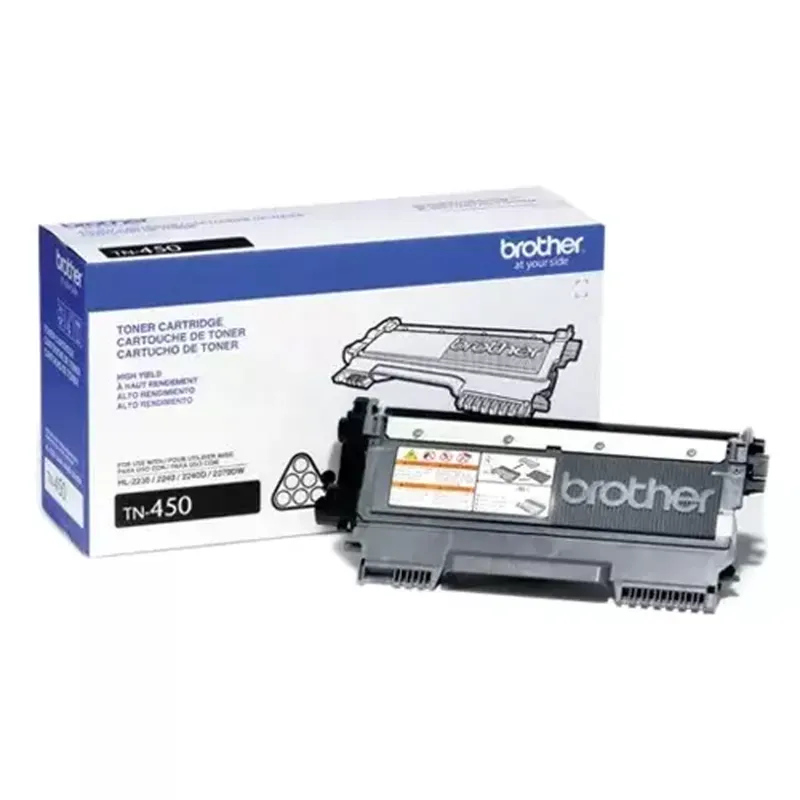
Brother Black TN-450 Black Toner Cartridge
| Brand | Brother |
| Weight (Approx.) | 700 gm |
| Model No | TN-450 |
| Color | Black |
| Cartridge Type | Ink Toner (Note: While commonly referred to as "ink toner," it's technically a toner cartridge for laser printers, not an ink cartridge for inkjet printers.) |
| Compatible For | DCP-7060D, DCP-7065DN, IntelliFax-2840, IntelliFAX-2940, HL-2220, HL-2230, HL-2240, HL-2240D, HL-2270DW, HL-2275DW, HL-2280DW, MFC-7240, MFC-7360N, MFC-7365DN, MFC-7460DN, MFC-7860DW |
| Genuine Brother Product | Guarantees optimal compatibility, reliability, and print quality compared to non-genuine or compatible cartridges. |
| High Yield (Implied) | Typically offers a higher page yield than standard yield cartridges, reducing the frequency of replacements and potentially lowering the cost per page. (Specific page yield is usually mentioned by the manufacturer but not provided here). |
| Consistent Print Quality | Delivers sharp, crisp, and professional-looking black text and images. |
| Easy Installation | Designed for straightforward installation into compatible Brother printers. |
| Reliable Performance | Engineered to work seamlessly with Brother laser printers, minimizing the risk of paper jams, smudging, or other printing issues. |
| Home Use | Printing documents, reports, assignments, and other black and white materials. |
| Small Office/Home Office (SOHO) | Handling daily printing needs such as invoices, letters, memos, and reports. |
| Business Use | Printing professional documents, forms, and other black and white output in office environments. |
| Educational Institutions | Printing worksheets, handouts, and other learning materials. |
| Preparation | Ensure the compatible Brother printer is powered on and ready. Open the printer's front cover or the designated cartridge access area. Refer to your printer's user manual for specific instructions. |
| Removing Old Cartridge (if applicable) | If you are replacing an empty cartridge, carefully remove the old one by following the printer's instructions. This usually involves releasing a locking mechanism or pulling the cartridge straight out. |
| Unpacking the New Cartridge | Remove the new Brother TN-450 toner cartridge from its packaging. |
| Shaking the Cartridge | Gently shake the new toner cartridge horizontally several times to distribute the toner powder evenly inside. This helps ensure consistent print quality. |
| Removing Protective Seals | Remove any protective tapes or seals from the new toner cartridge as indicated. |
| Installation | Align the new toner cartridge with the guides inside the printer and slide it firmly into place until it clicks or locks. In some Brother models, the toner cartridge is installed into a separate drum unit. Ensure both components are correctly installed according to your printer manual. |
| Closing the Cover | Close the printer's front cover or cartridge access area securely. |
| Storage | Store the toner cartridge in a cool, dry place, away from direct sunlight and extreme temperatures. Keep it in its original packaging until ready for use to prevent damage or toner leakage. |
| Handling | Handle the toner cartridge with care. Avoid dropping or subjecting it to strong impacts. |
| Avoid Opening | Do not attempt to open or refill the toner cartridge, as this can lead to damage, leaks, and void the warranty. |
| Printer Maintenance | Regularly maintain your Brother printer according to the manufacturer's recommendations (e.g., cleaning the drum unit, fuser unit) to ensure optimal performance and prolong the life of the toner cartridge and printer. For models using a separate drum unit, be mindful of its lifespan and replace it when necessary. |
| Low Toner Warning | Pay attention to low toner warnings displayed by your printer. Replace the cartridge when the print quality starts to decline or when the printer indicates it is empty. |
About Brother Black TN-450 Black Toner Cartridge
Brother Black TN-450 Black Toner Cartridge is listed under Coding Machine in Food Packaging Tools on ToolHaat, supplied by Brother. Key specifications include weight (approx.) 700 gm, model no TN-450, color Black, cartridge type Ink Toner (Note: While commonly referred to as "ink toner," it's technically a toner cartridge for laser printers, not an ink cartridge for inkjet printers.), compatible for DCP-7060D, DCP-7065DN, IntelliFax-2840, IntelliFAX-2940, HL-2220, HL-2230, HL-2240, HL-2240D, HL-2270DW, HL-2275DW, HL-2280DW, MFC-7240, MFC-7360N, MFC-7365DN, MFC-7460DN, MFC-7860DW. ToolHaat sells to businesses with GST invoicing, bulk-quantity pricing and delivery across India.
Brother Black TN-450 Black Toner Cartridge specifications
| Weight (Approx.) | 700 gm |
|---|---|
| Model No | TN-450 |
| Color | Black |
| Cartridge Type | Ink Toner (Note: While commonly referred to as "ink toner," it's technically a toner cartridge for laser printers, not an ink cartridge for inkjet printers.) |
| Compatible For | DCP-7060D, DCP-7065DN, IntelliFax-2840, IntelliFAX-2940, HL-2220, HL-2230, HL-2240, HL-2240D, HL-2270DW, HL-2275DW, HL-2280DW, MFC-7240, MFC-7360N, MFC-7365DN, MFC-7460DN, MFC-7860DW |
| Genuine Brother Product | Guarantees optimal compatibility, reliability, and print quality compared to non-genuine or compatible cartridges. |
| High Yield (Implied) | Typically offers a higher page yield than standard yield cartridges, reducing the frequency of replacements and potentially lowering the cost per page. (Specific page yield is usually mentioned by the manufacturer but not provided here). |
| Consistent Print Quality | Delivers sharp, crisp, and professional-looking black text and images. |
| Easy Installation | Designed for straightforward installation into compatible Brother printers. |
| Reliable Performance | Engineered to work seamlessly with Brother laser printers, minimizing the risk of paper jams, smudging, or other printing issues. |
| Home Use | Printing documents, reports, assignments, and other black and white materials. |
| Small Office/Home Office (SOHO) | Handling daily printing needs such as invoices, letters, memos, and reports. |
FAQs related to Brother Black TN-450 Black Toner Cartridge
Can we get a custom quote for Brother Black TN-450 Black Toner Cartridge matched to our production volume?
+
Yes — use the RFQ feature for Brother Black TN-450 Black Toner Cartridge orders that need to match a specific production line’s consumption rate, delivery frequency, or a combination of packaging SKUs delivered together.
What quality checks apply to Brother Black TN-450 Black Toner Cartridge before it ships?
+
Vendors listing Brother Black TN-450 Black Toner Cartridge on ToolHaat are verified, and products are checked against listed specifications before dispatch. For production-critical packaging, our team can arrange sample verification before a large order is confirmed.
What bulk quantities are available for Brother Black TN-450 Black Toner Cartridge?
+
Brother Black TN-450 Black Toner Cartridge is sold with tiered bulk pricing on ToolHaat — unit cost decreases as order quantity increases. For production-line volumes beyond the listed tiers, submit an RFQ for a dedicated quote matched to your packaging line’s throughput.
What if Brother Black TN-450 Black Toner Cartridge doesn’t match the specifications on the listing?
+
Contact ToolHaat support with your order ID if Brother Black TN-450 Black Toner Cartridge doesn’t match the listed specifications. Given production-line dependency on packaging supplies, replacement requests in this category are handled on priority.
How quickly can Brother Black TN-450 Black Toner Cartridge be delivered to a manufacturing facility?
+
Delivery timelines for Brother Black TN-450 Black Toner Cartridge depend on your location and order volume, shown at checkout. For manufacturing facilities that can’t afford a packaging-line stoppage, our sales team can help plan buffer-stock delivery schedules.
Related Products
View All →




You are viewing: Food Packaging Tools › Brother Black TN-450 Black Toner Cartridge